How to set tracking parameters on Google Ads?
Fibr synchronizes your Google Ads using the tracking parameters defined in each ad. If these parameters are missing or incorrectly configured, the ads cannot be used for personalization within Fibr.
Requirements for valid configuration of ads
Requirements for valid configuration of ads:
- {adgroupID}
- {keyword}
For the best results, Fibr recommends including all of the above variables in your Tracking Template. This ensures full compatibility and maximizes the accuracy and depth of Ad Personalization.
Recommended Tracking Template:
{lpurl}?utm_source={network}&utm_medium=cpc&utm_campaign={campaignid}&utm_adgroup={adgroupid}&utm_content={creative}&utm_term={keyword}Steps to fix your tracking template
Open your Google Ads account.
Navigate to Admin (located at the bottom of the left-hand menu) and select Account Settings.
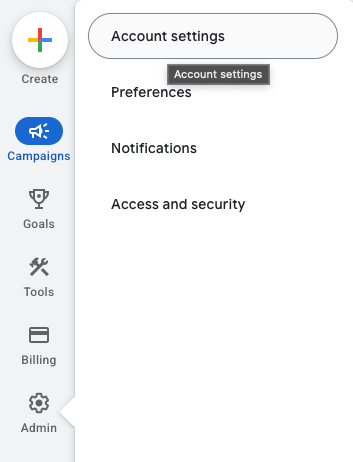
Expand the Tracking section.
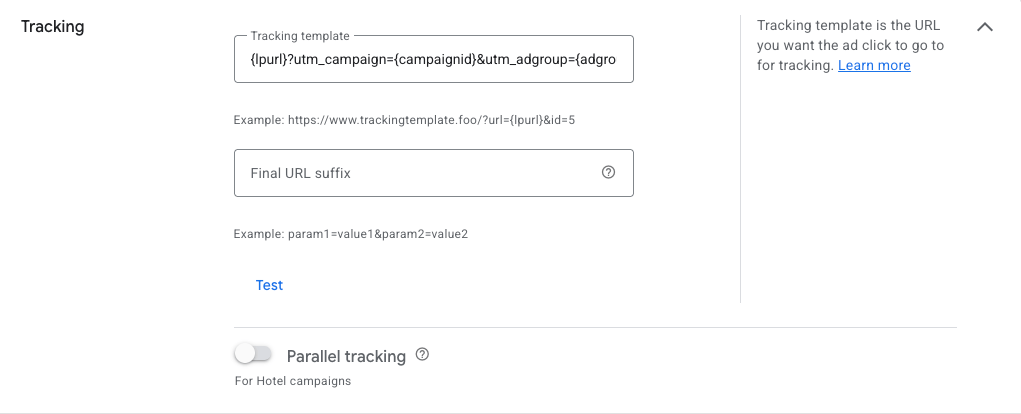
Add the required tracking template, then Save your changes.
Avoid using third-party tools that generate dynamic tracking templates. If such a tool is currently active, disable it to ensure Fibr can read your URL parameters correctly and use your ads for personaliz